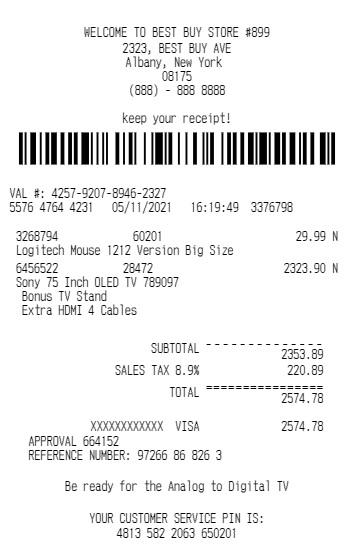
A receipt is a written record that confirms a payment transaction between a buyer and a seller. It shows the details of the purchase, including the amount paid, the date of the transaction, and the items or services involved. Many businesses rely on receipts to keep accurate financial records, manage taxes, and maintain transparency with customers.
Understanding how to make a receipt is essential for freelancers, small business owners, and beginners who want to keep their finances organized. A clear receipt builds trust with customers and helps businesses maintain professional documentation. Whether you run a shop, provide services, or sell products online, creating proper receipts ensures your transactions remain traceable and easy to verify.
Today, many people also use digital tools like a sample receipt maker to create quick and professional receipts. These tools simplify the process and allow beginners to generate receipts without advanced accounting knowledge.
What Information Should a Receipt Include?
Before learning how to make a receipt, you must understand the key information every receipt should contain. A well‑structured receipt ensures clarity and avoids confusion for both the buyer and the seller.
Here are the main elements every receipt should include:
- Business Name and Logo
The receipt should clearly display the business name. Adding a logo improves branding and makes the receipt look professional. - Contact Information
Include the business address, phone number, or email. This helps customers contact the business if they have questions about the purchase. - Receipt Number
Each receipt should have a unique number. This number helps businesses track transactions and maintain organized records. - Date of Transaction
Always mention the date when the payment occurred. This information is useful for accounting and tax purposes. - Customer Name
If applicable, add the customer’s name to personalize the receipt and maintain proper documentation. - Item or Service Description
Clearly list the products or services purchased. Include quantity, price per unit, and total cost. - Total Amount Paid
The receipt must show the final amount the customer paid, including taxes or discounts if applicable. - Payment Method
Mention whether the payment was made via cash, card, bank transfer, or digital wallet. - Signature or Authorization
Some receipts include a signature or stamp for validation.
Many businesses use tools like Expenses Receipt to simplify this process and ensure all essential information appears correctly on each receipt.
How to Make a Receipt Manually?
If you are new to business documentation, learning how to make a receipt manually is a good starting point. You can create a simple receipt using a notebook, printed template, or word processing software.
Follow these steps:
Step 1: Write the Business Details
Start the receipt with your business name, address, and contact information at the top.
Step 2: Add the Receipt Title
Write the word “Receipt” clearly so the document is easy to identify.
Step 3: Insert the Receipt Number and Date
Add a unique receipt number and the transaction date.
Step 4: Enter Customer Information
Write the customer’s name if the purchase requires documentation.
Step 5: List Purchased Items or Services
Create a table or list showing each product or service along with its price.
Step 6: Calculate the Total
Add the item prices and include any taxes or discounts.
Step 7: Mention Payment Method
Specify how the customer paid for the purchase.
Step 8: Add Signature or Stamp
Sign the receipt if necessary to confirm authenticity.
Although manual receipts work well for small businesses, digital tools make the process faster and more professional.
How Can a Sample Receipt Maker Simplify the Process?
Modern businesses prefer digital tools because they save time and reduce errors. A sample receipt maker allows users to generate receipts instantly by filling in basic transaction details.
Instead of formatting documents manually, you simply enter the information into the tool, and it automatically creates a structured receipt.
Here are some advantages of using a sample receipt maker:
- Faster receipt generation
- Professional formatting
- Automatic calculations
- Easy storage and sharing
- Reduced risk of mistakes
Platforms like Expenses Receipt provide simple tools that help beginners create clear and organized receipts in just a few minutes.
What Are the Different Types of Receipts?
When learning how to make a receipt, it helps to understand the different types commonly used in business.
Cash Receipt
This receipt confirms payment made in cash.
Sales Receipt
A sales receipt records the purchase of goods or services and includes detailed item descriptions.
Digital Receipt
Businesses send digital receipts through email or messaging platforms after online purchases.
Payment Receipt
This receipt confirms that a customer has completed a payment for a specific service or invoice.
Deposit Receipt
A deposit receipt shows that a partial payment has been made in advance.
Different businesses use different receipt formats depending on their transaction type.
How to Create a Professional Receipt Format?
A professional receipt format improves credibility and keeps records organized. Beginners should focus on clarity, structure, and readability when creating receipts.
Here are a few tips to create a professional receipt:
Use Clear Sections
Separate business details, transaction details, and payment information.
Choose Simple Fonts
Avoid decorative fonts. Use clear fonts that are easy to read.
Add Itemized Details
Always list items individually rather than combining them into one total.
Include Taxes and Discounts
Transparency builds trust with customers.
Use Consistent Layouts
Consistency helps customers quickly understand the receipt format.
Using a sample receipt maker helps maintain this structure automatically.
Why Should Small Businesses Use Digital Receipts?
Digital receipts are becoming increasingly popular because they offer convenience and efficiency.
Here are some benefits:
Easy Record Keeping
Digital receipts can be stored and searched easily.
Eco‑Friendly
Businesses reduce paper waste by using digital receipts.
Fast Sharing
You can send receipts instantly through email or messaging platforms.
Better Organization
Digital systems categorize receipts by date, customer, or payment method.
Many small businesses rely on tools such as Expenses Receipt to generate digital receipts quickly and maintain organized financial records.
What Mistakes Should You Avoid When Making a Receipt?
Beginners sometimes make simple mistakes while learning how to make a receipt. Avoiding these errors helps maintain accurate records.
Common mistakes include:
- Forgetting to include the receipt number
- Missing the transaction date
- Not listing item descriptions clearly
- Incorrect total calculations
- Forgetting to mention payment method
Using a sample receipt maker significantly reduces these errors because most tools automatically generate structured receipts.
How Can Beginners Start Making Receipts Today?
Creating receipts does not require advanced accounting skills. Beginners can start by using simple templates or digital tools.
Start with these steps:
- Decide whether you want to create manual or digital receipts.
- Use a basic receipt format that includes essential transaction details.
- Keep every receipt organized for future reference.
- Use digital tools if you want faster and more professional results.
Once you understand how to make a receipt, the process becomes quick and routine. Over time, organized receipts will help you manage finances, track sales, and maintain accurate business records.
Final Thoughts
Learning how to make a receipt is a valuable skill for beginners, freelancers, and small business owners. Receipts provide proof of transactions, improve financial organization, and build trust with customers.
By including the correct details, using clear formatting, and maintaining accurate records, anyone can create professional receipts. Beginners can also simplify the process by using a sample receipt maker, which automatically generates well‑structured receipts.
Tools like Expenses Receipt make receipt creation even easier by offering ready‑to‑use templates and automated calculations. With the right approach and tools, beginners can create professional receipts quickly and maintain organized business documentation.
