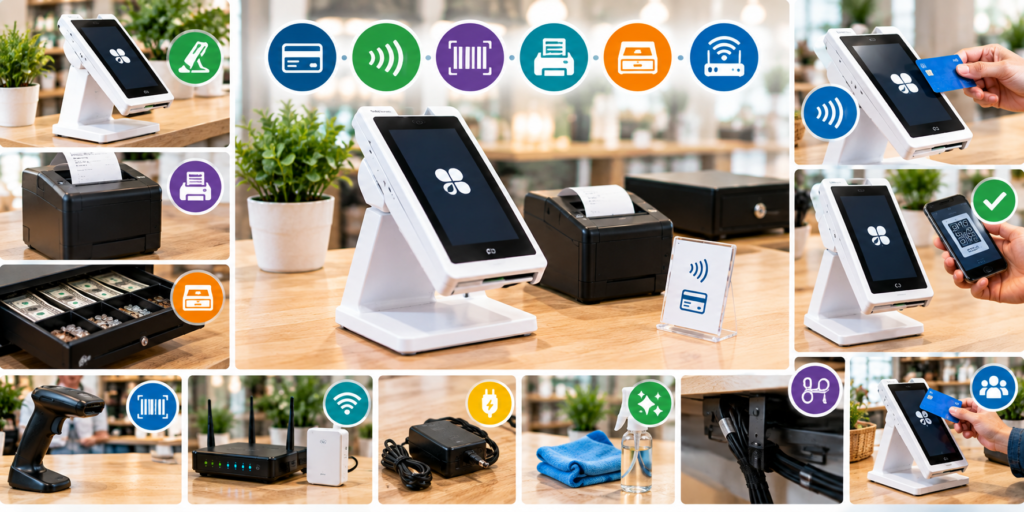
A good POS system helps businesses manage payments and daily sales with less effort. It allows staff to accept payments, check transactions, and keep the checkout process organised. However, the POS terminal is only one part of the setup. The right accessories can make it easier to use and help your business run more smoothly.
The Clover Mini 3 is a compact payment terminal that fits well on many checkout counters. Adding suitable accessories can help you save space, keep equipment organised, and make payments more convenient for your staff and customers.
Whether you own a retail store, café, restaurant, salon, or small business, choosing the right accessories can improve your daily work. In this guide, we will look at useful accessories for the Clover Mini 3, explain their benefits, and help you decide which ones are worth considering.
Why Should You Add Accessories to Your Clover Mini 3?
Accessories can help you get more from your POS system. Some make checkout easier, while others help with cash handling, product scanning, printing receipts, or keeping cables in place.
The right accessories can help you:
- Keep your checkout counter neat and organised.
- Make daily payments easier to manage.
- Reduce the time spent on certain checkout tasks.
- Improve the customer payment experience.
- Keep connected equipment in the right place.
- Support your staff during busy hours.
Every business has different needs. A clothing store may need a barcode scanner, while a café may need a receipt printer. Before buying any accessory, think about how your business works and what could make your daily tasks easier.
1. A Stand for Your Clover Mini 3
A stand is a useful accessory for keeping your Clover Mini 3 in a fixed and stable position. It can help you organise the checkout counter and make the screen easier to view.
Without a proper stand, the terminal may take up more counter space than needed or be moved around during the day. A suitable stand gives it a clear place and helps staff use it more comfortably.
Benefits of Using a POS Stand
- Keeps the terminal stable: A suitable stand helps prevent unwanted movement during normal use.
- Makes the screen easier to view: The right angle can help staff and customers see payment instructions.
- Saves counter space: A well-designed stand can make better use of the available area.
- Creates a neat setup: Keeping the terminal in one place helps reduce clutter.
Before buying a stand, make sure it is designed for the Clover Mini 3. Check its size, strength, and whether it allows easy access to the power cable and other required connections.
2. Receipt Printer
A receipt printer is helpful for businesses that provide customers with printed receipts. Some customers prefer paper receipts for their records, while others may need them for returns or expense reports.
A compatible printer can help staff print receipts without adding extra steps to the checkout process.
Which Businesses Can Benefit from a Receipt Printer?
A receipt printer may be useful for:
- Retail shops that handle regular sales.
- Cafés and restaurants that provide printed payment records.
- Salons and service businesses that give customers proof of payment.
- Businesses that need paper records for daily transactions.
Before buying a printer, check the printing features already available in your Clover Mini 3 setup. Depending on your equipment and configuration, you may already have a suitable option.
Also, check the printer’s compatibility, connection type, paper size, and the cost of replacement paper.
3. Cash Drawer
If your business accepts cash payments, a cash drawer can help you keep money organised. It provides separate spaces for notes and coins, making it easier for staff to handle cash during the day.
A cash drawer also helps keep money in one place instead of leaving it loose on the counter.
What Should You Check Before Buying a Cash Drawer?
Choose a drawer that fits your counter and works with your POS setup. Some cash drawers connect through a compatible receipt printer, while others may need a different connection.
Before purchasing one, check the following:
- Whether it is compatible with your Clover Mini 3 setup.
- How it connects to the terminal or printer.
- Whether it has enough space for your daily cash needs.
- Whether it includes separate sections for notes and coins.
- Whether it can be secured when not in use.
A cash drawer is worth considering if you handle cash regularly. If your business only accepts card or other electronic payments, you may not need one.
4. Barcode Scanner
A barcode scanner can make checkout easier for businesses that sell products with barcodes. Instead of entering product details by hand, staff can scan an item to identify it in the POS system.
This can save time and help reduce mistakes when entering product codes.
Which Businesses Need a Barcode Scanner?
A barcode scanner may be useful for:
- Clothing and shoe stores.
- Grocery and convenience shops.
- Gift shops.
- Homeware stores.
- Retail businesses with many products.
For example, a shop with hundreds of items may find scanning much easier than searching for every product manually. However, a service business that mainly takes bookings may have little need for this accessory.
Before buying a scanner, confirm that it works with your Clover Mini 3 hardware and software. Also, check its connection type and whether any setup is needed.
5. Network Accessories for a Reliable Connection
A stable internet connection is important for many POS features. If the connection is weak or keeps dropping, payment processing and other online tasks may be interrupted.
Network accessories can help improve your setup, depending on the cause of the connection problem.
Useful Network Accessories
Reliable router: A suitable router can help provide a steady internet connection throughout your business.
Ethernet cable: If your POS setup supports a wired connection, an Ethernet cable may provide a reliable way to connect equipment.
Wi-Fi extender: This may help improve wireless coverage in areas where the signal is weak.
Cable clips: These help keep network cables in place and prevent them from becoming tangled.
Before buying any network accessory, check which connection options your Clover Mini 3 setup supports. If payment problems continue, check your internet service and contact your payment provider for help.
6. Power Adapter and Backup Power
Your POS terminal needs the correct power supply to work properly. Using a suitable adapter and cable helps keep the equipment running as expected.
It is best to use the power accessories supplied with the terminal or those approved for your exact model. An unsuitable adapter may not provide the required power and could damage the device.
Is a Backup Power Supply Worth Considering?
A backup power supply may be useful if your business experiences power cuts. Depending on your setup, an uninterruptible power supply (UPS) may keep supported equipment running for a short time during an outage.
Before choosing a backup power supply, check the power needs of your terminal and connected equipment.
Keep in mind that a backup power supply does not guarantee that payments will continue during a power cut. Your internet connection and other equipment may also need power.
7. Screen Cleaning and Protection Accessories
The touchscreen is one of the most important parts of the Clover Mini 3. Staff may use it many times each day, so keeping it clean can make it more pleasant to use.
A soft, lint-free cloth is a simple and useful item for removing fingerprints and everyday marks.
Should You Use a Screen Protector?
A screen protector may help protect the display from small scratches. However, it must fit the terminal’s screen properly and should not affect touch response or make the display hard to read.
Before purchasing one, make sure it is designed for the correct model. Avoid protectors that cover important parts of the device.
Always follow the manufacturer’s cleaning instructions. Do not spray cleaning liquid directly onto the terminal, and avoid products that may damage the screen.
8. Cable Management Accessories
Loose cables can make your checkout counter look messy. They can also get tangled, come loose, or be pulled accidentally while staff work.
Cable management accessories help keep wires neat and out of the way.
Some useful options include:
- Cable clips: Hold cables in place along the counter.
- Cable sleeves: Keep several wires together.
- Cable holders: Help stop cables from moving around.
- Under-counter cable trays: Keep wires off the main work surface.
These accessories can make the checkout area easier to clean and use. Make sure cables are not stretched too tightly or placed where staff and customers could trip over them.
9. Customer Payment Accessories
A smooth checkout process should be easy for both staff and customers. A suitable stand and a well-organised payment area can help customers see the screen and follow the payment instructions.
Clear signs showing accepted payment methods may also help customers know what to expect.
How Can These Accessories Help?
- Make it clear where customers should complete their payment.
- Help staff guide customers through the process.
- Keep the checkout area neat and professional.
- Reduce confusion during busy periods.
Make sure any signs or accessories do not block the screen or prevent customers from using the terminal. Follow the instructions for supported payment methods, including contactless payments.
10. How to Choose the Right Accessories
You do not need to buy every accessory available. The best choice depends on your business type, daily tasks, and budget.
Use the table below to compare some common accessories for your Clover Mini 3 setup.
| Accessory | Main Benefit | Best For |
| POS stand | Keeps the terminal stable and easy to reach | Most businesses with a fixed checkout |
| Receipt printer | Provides printed receipts | Retail shops, cafés, and service businesses |
| Cash drawer | Keeps notes and coins organised | Businesses that accept cash |
| Barcode scanner | Helps identify products quickly | Retail shops with barcoded items |
| Network accessories | Help support a reliable connection | Businesses with weak Wi-Fi or connection issues |
| Backup power supply | May keep supported equipment running during an outage | Businesses affected by power cuts |
| Cleaning cloth | Helps keep the screen clean | All businesses |
| Cable management tools | Keeps wires neat and out of the way | Busy or small checkout counters |
Tips Before Buying Accessories
Check compatibility: Make sure the accessory works with your exact Clover Mini 3 model and setup. Do not assume that an accessory for another POS terminal will work.
Think about your daily needs: Choose items that solve real problems. For example, a barcode scanner may help a shop with many products, while a cash drawer may be more useful for a business that handles cash.
Measure your counter space: Check the size of each accessory before buying it. You need enough room for the terminal and any extra equipment.
Consider ongoing costs: Some accessories need replacement paper, cables, or other supplies. Include these costs when planning your budget.
Ask for advice if needed: If you are unsure whether an accessory will work, ask your payment provider or equipment supplier to confirm the details.
Frequently Asked Questions
1. What is the most useful accessory for the Clover Mini 3?
A suitable stand is a good starting point for many businesses because it keeps the terminal stable and organised. However, the best accessory depends on your needs. A retail store may prefer a barcode scanner, while a business that accepts cash may need a cash drawer.
2. Can I use a barcode scanner with the Clover Mini 3?
A barcode scanner may work with the Clover Mini 3 if it is supported by your hardware and POS software. Check the connection type and compatibility before buying one.
3. Do I need a separate receipt printer?
Not always. Your current setup may already support the printing features you need. Check your equipment and confirm whether a separate printer is required before making a purchase.
4. Is a cash drawer necessary?
A cash drawer is useful if you regularly accept cash payments. It helps keep money organised and provides a dedicated place for notes and coins. Businesses that only accept electronic payments may not need one.
5. Can accessories make checkout faster?
Yes, some accessories can reduce the number of steps needed during checkout. For example, a compatible barcode scanner can help staff identify products quickly, while a suitable stand can make the terminal easier to use.
6. How can I keep my POS setup neat?
Keep the terminal in a fixed place, secure loose cables, clean the screen as recommended, and arrange connected equipment so staff can reach it easily. Avoid adding accessories that take up too much counter space.
7. How can I check whether an accessory is compatible?
Check the accessory’s product details, supported terminal models, and connection requirements. If you are still unsure, contact your payment provider or equipment supplier before placing an order.
Final Thoughts
Choosing the right accessories can help you get more from your Clover Mini 3 POS setup. A stand can improve placement, a receipt printer can help with printed records, and a barcode scanner can make product checkout easier. Cash drawers, network accessories, and cable organisers can also support your daily work.
The best approach is to start with the tasks that take the most time or cause the most problems. Check compatibility, available space, and ongoing costs before buying anything. You can learn more about payment solutions and equipment at Florida Payments.
